OneMiners★ Промотирано✓ Проверен търговецУдължена гаранцияПлащане на вноскиВ наличност, бърза доставкаAntminer S19k Pro - 110 TH/sХостинг при тях от $0.0364/kWh, $67 на месецИзпраща се от: United States · проверено преди 23 ч
✓ В наличност
Най-добра цена$297164 дни възвръщаемост · $2.70/TH
Калкулаторът от нашата безплатна джаджа: всяка възвръщаемост на тази страница се изчислява с него.
Приход на ден
$4.02
Ток на ден
−$2.21
Хостинг на ден
—
Печалба на ден
$1.81
Възвръщаемост при $297
—
Печалбата и възвръщаемостта са оценки по днешните цени на монетите и трудността на мрежата, преди таксите на пула, хостинга и данъците. Променят се всеки ден. Не е финансов съвет.
Класациите използват основната монета на алгоритъма (BTC за SHA-256, LTC + DOGE за Scrypt): малките странични мрежи днес може да плащат повече на хеш, но не могат да поемат много хешрейт.
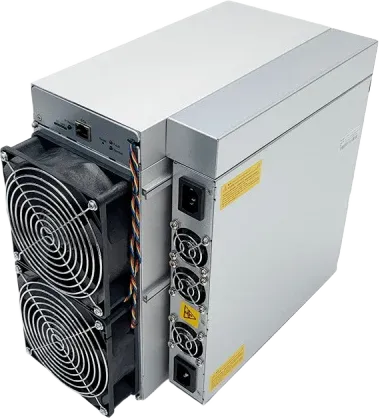
Bitmain Antminer S19k Pro (110Th) е ASIC миньор от Bitmain за алгоритъма SHA-256, с 110 TH/s при 2,530 W. Дата на излизане: април 2023 г.. С 23.0 J/TH използва с 15% повече енергия на хеш от медианния SHA-256 миньор, който следим (20.0 J/TH). При $0.036/kWh е №157 от 299 SHA-256 миньора по дневна печалба и изкарва около $1.81 на ден, копаейки BTC. Най-добрата цена в AsicProfit е $297. При днешните нива би се изплатил за около 164 дни. С 75 dB мястото му е в специализиран копачен обект или хостинг.
Въпроси и отговори 6
Попитайте за този майнер. Проверените акаунти питат и отговарят, търговците отговарят от името на магазина си, а всяка публикация се проверява, преди да се покаже.
Ryan M. · 26.10.2026 г. · за друга версия
Getting a fan error. How do I find which of the four fans has failed?
AsicProfit SupportAsicProfit · 27.10.2026 г.
The fan numbers in the log do not always match the labels on the control board, which confuses many owners. The quickest way is to check the fan speeds in the status page, then unplug fans one at a time and watch which reading changes. Replace with a fan that has the same connector type. Owners running several units keep spare fans on hand, since fans fail far more often than boards.
Stefan I. · 22.10.2026 г. · за друга версия
how noisy is the s19k pro, could it go in a spare bedroom with a sound box
AsicProfit SupportAsicProfit · 22.10.2026 г.
It is listed at about 75 dB with four fans, which is too loud for a bedroom. A sound-dampening box helps, but it must not starve the miner of air. One owner's abnormal hashrate and restart problems went away after taking the miner out of its noise box and reseating the power cables. A garage or ventilated outbuilding, with ducting for the hot exhaust, is the usual home setup.
Mikkel J. · 17.10.2026 г. · за друга версия
Is a 23 J/TH machine like the S19k Pro still worth buying now?
AsicProfit SupportAsicProfit · 19.10.2026 г.
It can be, but only with cheap power. At around 23 J/TH it spends more electricity per terahash than current-generation machines, so rising network difficulty or a lower Bitcoin price squeezes its margin first. Its appeal is a lower purchase price and modest 2.76 kW draw. Put your real electricity price into the calculator on this page and compare it with a newer model before deciding.
Omar H. · 1.10.2026 г. · за друга версия
Can I run an S19k Pro on 110V/120V household power?
AsicProfit SupportAsicProfit · 1.10.2026 г.
No. It is built for 220V-class input and draws about 2,760 W, and an experienced forum helper warned an owner that it will not run normally on 110V. On 230V it pulls about 12A, so give it a dedicated circuit rather than sharing one with other loads, and plug it in directly instead of through a light extension lead. Unstable power is a common cause of restarts and hashrate drops.
Janez N. · 16.09.2026 г. · за друга версия
Updated firmware and now it says board name doesn't match and won't hash. Can I fix it?
AsicProfit SupportAsicProfit · 17.09.2026 г.
That error means the firmware does not match your hashboard revision. Newer S19k Pro batches can need a specific firmware, and flashing third-party or older images can leave the unit unable to start. If the unit is still under warranty, ask Bitmain support for the correct firmware for your serial number first. The SD card recovery image from Bitmain's download page is the next step. Avoid flashing a new, working machine just to try other firmware.
Ivan G. · 16.09.2026 г. · за друга версия
one hashboard only finds 76 of 77 chips after a restart, what should i check?
AsicProfit SupportAsicProfit · 17.09.2026 г.
Start simple: power off, reseat and clean the data cable between control board and hashboard, then test each board on its own, since one faulty board can upset readings for the others. Try the stock firmware and a factory reset. If the board still drops a chip, a missing chip in a series chain usually needs a repair shop or a warranty claim. Some third-party firmware will run a board with a weak chip, but it cannot bypass a dead one.
Влезте с проверен акаунт, за да зададете въпрос. Вход




















 PPC
PPC BC2
BC2 XEC
XEC BSV
BSV BTC
BTC BCH
BCH FB
FB NMC
NMC QUAI
QUAI