OneMiners★ Fremhævet✓ Verificeret forhandlerUdvidet garantiAfdragsbetalingPå lager, hurtig leveringAntminer S19k Pro - 110 TH/sHost hos dem fra $0.0364/kWh, $67 om månedenSendes fra United States · tjekket for 23 t siden
✓ På lager
Bedste pris$297164 dage tilbagebetaling · $2.70/TH
Beregneren fra vores gratis widget: hver tilbagebetalingstid på siden bygger på den.
Indtægt pr. dag
$4.02
Strøm pr. dag
−$2.21
Hosting pr. dag
—
Overskud pr. dag
$1.81
Tilbagebetalt ved $297
—
Fortjeneste og tilbagebetaling er estimater ud fra dagens møntkurser og netværkets difficulty, før poolgebyrer, hosting og skat. De ændrer sig hver dag. Ikke finansiel rådgivning.
Ranglisterne bruger algoritmens hovedmønt (BTC for SHA-256, LTC + DOGE for Scrypt): små sidekæder kan betale mere pr. hash i dag, men kan ikke optage ret meget hashrate.
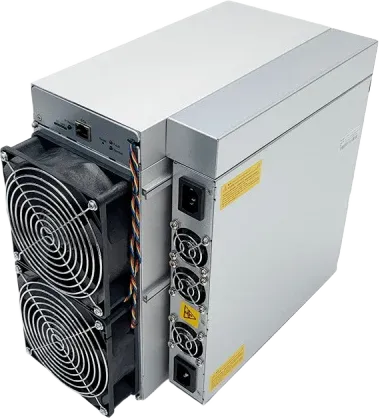
Bitmain Antminer S19k Pro (110Th) er en ASIC-miner fra Bitmain til SHA-256-algoritmen med 110 TH/s ved 2,530 W. Den kom på markedet i april 2023. Med 23.0 J/TH bruger den 15% mere strøm pr. hash end medianen af de SHA-256-minere, vi følger (20.0 J/TH). Ved $0.036/kWh er den nr. 157 af 299 SHA-256-minere målt på daglig profit og tjener omkring $1.81 om dagen på BTC. Den bedste pris på AsicProfit er $297. Med dagens tal tjener den sig selv hjem på omkring 164 dage. Med 75 dB hører den til i et dedikeret mining-anlæg eller hosting.
Spørgsmål og svar 6
Spørg om denne miner. Verificerede konti spørger og svarer, forhandlere svarer som deres butik, og hvert indlæg tjekkes, før det vises.
Ryan M. · 26. okt. 2026 · om en anden version
Getting a fan error. How do I find which of the four fans has failed?
AsicProfit SupportAsicProfit · 27. okt. 2026
The fan numbers in the log do not always match the labels on the control board, which confuses many owners. The quickest way is to check the fan speeds in the status page, then unplug fans one at a time and watch which reading changes. Replace with a fan that has the same connector type. Owners running several units keep spare fans on hand, since fans fail far more often than boards.
Stefan I. · 22. okt. 2026 · om en anden version
how noisy is the s19k pro, could it go in a spare bedroom with a sound box
AsicProfit SupportAsicProfit · 22. okt. 2026
It is listed at about 75 dB with four fans, which is too loud for a bedroom. A sound-dampening box helps, but it must not starve the miner of air. One owner's abnormal hashrate and restart problems went away after taking the miner out of its noise box and reseating the power cables. A garage or ventilated outbuilding, with ducting for the hot exhaust, is the usual home setup.
Mikkel J. · 17. okt. 2026 · om en anden version
Is a 23 J/TH machine like the S19k Pro still worth buying now?
AsicProfit SupportAsicProfit · 19. okt. 2026
It can be, but only with cheap power. At around 23 J/TH it spends more electricity per terahash than current-generation machines, so rising network difficulty or a lower Bitcoin price squeezes its margin first. Its appeal is a lower purchase price and modest 2.76 kW draw. Put your real electricity price into the calculator on this page and compare it with a newer model before deciding.
Omar H. · 1. okt. 2026 · om en anden version
Can I run an S19k Pro on 110V/120V household power?
AsicProfit SupportAsicProfit · 1. okt. 2026
No. It is built for 220V-class input and draws about 2,760 W, and an experienced forum helper warned an owner that it will not run normally on 110V. On 230V it pulls about 12A, so give it a dedicated circuit rather than sharing one with other loads, and plug it in directly instead of through a light extension lead. Unstable power is a common cause of restarts and hashrate drops.
Janez N. · 16. sep. 2026 · om en anden version
Updated firmware and now it says board name doesn't match and won't hash. Can I fix it?
AsicProfit SupportAsicProfit · 17. sep. 2026
That error means the firmware does not match your hashboard revision. Newer S19k Pro batches can need a specific firmware, and flashing third-party or older images can leave the unit unable to start. If the unit is still under warranty, ask Bitmain support for the correct firmware for your serial number first. The SD card recovery image from Bitmain's download page is the next step. Avoid flashing a new, working machine just to try other firmware.
Ivan G. · 16. sep. 2026 · om en anden version
one hashboard only finds 76 of 77 chips after a restart, what should i check?
AsicProfit SupportAsicProfit · 17. sep. 2026
Start simple: power off, reseat and clean the data cable between control board and hashboard, then test each board on its own, since one faulty board can upset readings for the others. Try the stock firmware and a factory reset. If the board still drops a chip, a missing chip in a series chain usually needs a repair shop or a warranty claim. Some third-party firmware will run a board with a weak chip, but it cannot bypass a dead one.
Log ind med en verificeret konto for at stille et spørgsmål. Log ind



















 PPC
PPC BC2
BC2 XEC
XEC BSV
BSV BTC
BTC BCH
BCH FB
FB NMC
NMC QUAI
QUAI