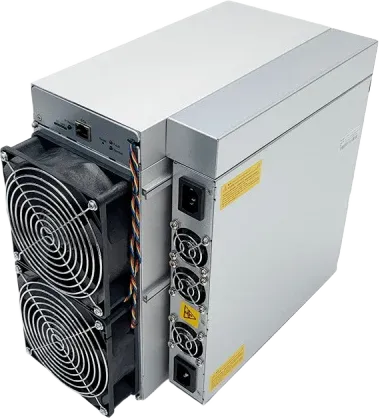
OneMiners★ Promovat✓ Vânzător verificatGaranție extinsăPlată în rateÎn stoc, livrare rapidăAntminer S19k Pro - 110 TH/sGăzduire la ei de la $0.0364/kWh, $67 pe lunăExpediat din United States · verificat acum 23 h
✓ În stoc
Cel mai bun preț$297164 zile amortizare · $2.70/TH
Calculatorul din widgetul nostru gratuit: fiecare termen de recuperare de pe această pagină îl folosește.
Venit pe zi
$4.02
Curent pe zi
−$2.21
Găzduire pe zi
—
Profit pe zi
$1.81
Recuperare la $297
—
Profitul și amortizarea sunt estimări pe baza prețurilor monedelor și a dificultății rețelei de azi, înainte de comisioanele pool-ului, găzduire și taxe. Se schimbă în fiecare zi. Nu reprezintă consultanță financiară.
Clasamentele folosesc moneda principală a algoritmului (BTC pentru SHA-256, LTC + DOGE pentru Scrypt): rețelele secundare mici pot plăti azi mai mult pe hash, dar nu pot absorbi mult hashrate.
Bitmain Antminer S19k Pro (110Th) este un miner ASIC de la Bitmain pentru algoritmul SHA-256, cu 110 TH/s la 2,530 W. A apărut în aprilie 2023. Cu 23.0 J/TH consumă cu 15% mai multă energie pe hash decât mediana minerelor SHA-256 pe care le urmărim (20.0 J/TH). La $0.036/kWh se află pe locul 157 din 299 minere SHA-256 după profitul zilnic și câștigă circa $1.81 pe zi minând BTC. Cel mai bun preț pe AsicProfit este $297. La valorile de azi s-ar amortiza în circa 164 zile. La 75 dB locul lui este într-o fermă de minare sau un centru de hosting.
Întrebări și răspunsuri 6
Întrebați despre acest miner. Conturile verificate întreabă și răspund, vânzătorii răspund în numele magazinului, iar fiecare mesaj este verificat înainte de a apărea.
Ryan M. · 26 oct. 2026 · despre altă versiune
Getting a fan error. How do I find which of the four fans has failed?
AsicProfit SupportAsicProfit · 27 oct. 2026
The fan numbers in the log do not always match the labels on the control board, which confuses many owners. The quickest way is to check the fan speeds in the status page, then unplug fans one at a time and watch which reading changes. Replace with a fan that has the same connector type. Owners running several units keep spare fans on hand, since fans fail far more often than boards.
Stefan I. · 22 oct. 2026 · despre altă versiune
how noisy is the s19k pro, could it go in a spare bedroom with a sound box
AsicProfit SupportAsicProfit · 22 oct. 2026
It is listed at about 75 dB with four fans, which is too loud for a bedroom. A sound-dampening box helps, but it must not starve the miner of air. One owner's abnormal hashrate and restart problems went away after taking the miner out of its noise box and reseating the power cables. A garage or ventilated outbuilding, with ducting for the hot exhaust, is the usual home setup.
Mikkel J. · 17 oct. 2026 · despre altă versiune
Is a 23 J/TH machine like the S19k Pro still worth buying now?
AsicProfit SupportAsicProfit · 19 oct. 2026
It can be, but only with cheap power. At around 23 J/TH it spends more electricity per terahash than current-generation machines, so rising network difficulty or a lower Bitcoin price squeezes its margin first. Its appeal is a lower purchase price and modest 2.76 kW draw. Put your real electricity price into the calculator on this page and compare it with a newer model before deciding.
Omar H. · 1 oct. 2026 · despre altă versiune
Can I run an S19k Pro on 110V/120V household power?
AsicProfit SupportAsicProfit · 1 oct. 2026
No. It is built for 220V-class input and draws about 2,760 W, and an experienced forum helper warned an owner that it will not run normally on 110V. On 230V it pulls about 12A, so give it a dedicated circuit rather than sharing one with other loads, and plug it in directly instead of through a light extension lead. Unstable power is a common cause of restarts and hashrate drops.
Janez N. · 16 sept. 2026 · despre altă versiune
Updated firmware and now it says board name doesn't match and won't hash. Can I fix it?
AsicProfit SupportAsicProfit · 17 sept. 2026
That error means the firmware does not match your hashboard revision. Newer S19k Pro batches can need a specific firmware, and flashing third-party or older images can leave the unit unable to start. If the unit is still under warranty, ask Bitmain support for the correct firmware for your serial number first. The SD card recovery image from Bitmain's download page is the next step. Avoid flashing a new, working machine just to try other firmware.
Ivan G. · 16 sept. 2026 · despre altă versiune
one hashboard only finds 76 of 77 chips after a restart, what should i check?
AsicProfit SupportAsicProfit · 17 sept. 2026
Start simple: power off, reseat and clean the data cable between control board and hashboard, then test each board on its own, since one faulty board can upset readings for the others. Try the stock firmware and a factory reset. If the board still drops a chip, a missing chip in a series chain usually needs a repair shop or a warranty claim. Some third-party firmware will run a board with a weak chip, but it cannot bypass a dead one.
Autentificați-vă cu un cont verificat pentru a pune o întrebare. Autentificare


















 PPC
PPC BC2
BC2 XEC
XEC BSV
BSV BTC
BTC BCH
BCH FB
FB NMC
NMC QUAI
QUAI